


You can turn your Shopify store into a mobile app for iOS and Android without coding. With a Shopify mobile app builder, you can connect your existing store, customize the app’s design, and publish it to the Apple App Store and Google Play.
Your products, prices, inventory, and checkout can remain connected to Shopify, so you don’t need to rebuild your ecommerce operations.
But creating the app is only part of the process. You also need to choose the right solution, prepare your app for publication, and give customers a reason to download and use it.
This guide covers the five steps to turn your Shopify store into an app, what it costs, and how to make it a valuable sales channel.
Can You Turn a Shopify Store Into a Mobile App?
Yes. Shopify merchants can create branded mobile shopping apps that connect directly to their existing Shopify stores.
A Shopify mobile app allows customers to browse products, add items to their carts, complete purchases, and access their accounts from an iPhone or Android device.
Instead of managing two separate ecommerce systems, you can operate your website and mobile app as connected shopping channels.
Shopify supports this through its Storefront API and Checkout Kit, which enable mobile apps to access product information, manage carts, and use Shopify checkout.
With a compatible mobile app builder, updates to products, prices, and inventory in Shopify can also sync to your mobile app automatically.
Three Ways to Convert Your Shopify Store Into an App
There are three main ways to create a Shopify mobile app, depending on your technical requirements, budget, and desired functionality.
| Method | Best for | Key advantages | Main limitations |
|---|---|---|---|
| No-code mobile app builder (Recommended) | Most Shopify merchants wanting branded iOS and Android apps | Fast launch, no coding, built-in Shopify synchronization, predictable pricing, and managed technical maintenance | Customization depends on the builder’s capabilities |
| Custom app development | Businesses with unique requirements that existing builders cannot support | Maximum flexibility and control over custom features | Higher costs, longer development time, and ongoing technical maintenance |
| Progressive Web App (PWA) | Merchants who want to improve their mobile website with app-like features | No conventional app-store launch required; customers can access it through a browser | Different native device capabilities and app-store distribution options |
For most Shopify merchants, a no-code mobile app builder offers the best balance of speed, cost, functionality, and ease of management. It removes the need to hire developers while providing essential ecommerce features, Shopify integrations, and a branded mobile shopping experience.
Custom development becomes more relevant when your business has specialized requirements that existing builders cannot accommodate. PWAs are worth considering when your priority is improving the mobile web experience rather than launching a dedicated native app.
The right choice ultimately depends on your business needs, but you don’t need to build an app from scratch to offer customers a high-quality mobile shopping experience.
No-Code Mobile App Builders
No-code mobile app builders connect directly to your Shopify store and provide visual tools for designing and managing your app.
You can customize your homepage, product displays, navigation, and other shopping features without writing code.
Many builders also provide native iOS and Android apps, push notifications, integrations, and app-store publishing support.
This is generally the most practical approach for merchants who want a branded shopping app without managing a development team.
Custom Mobile App Development
Custom development gives businesses greater control over their app’s functionality, design, and technical architecture.
Developers can use Shopify’s APIs to build mobile shopping experiences tailored to specific requirements.
However, custom apps require development expertise, testing, ongoing maintenance, and compatibility updates.
This approach makes more sense when your business needs functionality that existing app builders cannot adequately support.
Progressive Web Apps (PWAs)
A PWA is a website designed to provide certain app-like experiences, including installation on a device’s home screen where supported.
PWAs can improve mobile accessibility without requiring the same native app development process.
However, they differ from native iOS and Android apps in their device integrations, capabilities, and distribution options.
If your goal is to publish a dedicated shopping app on both major app stores, a native mobile app builder or custom development is usually the more appropriate route.
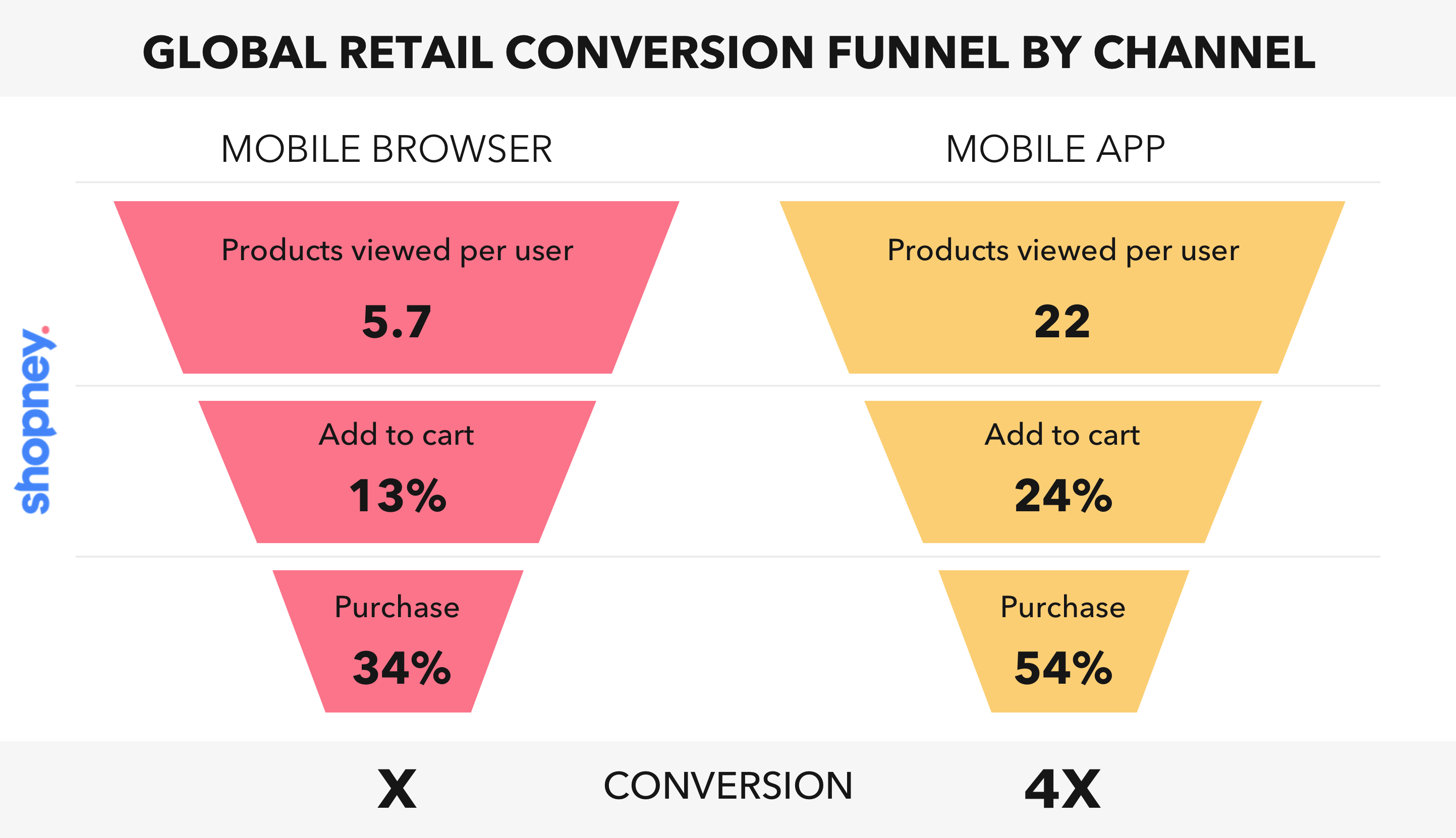
Image: Shopney
How to Turn Your Shopify Store Into a Mobile App in 5 Steps
Creating a Shopify mobile app doesn’t have to involve a lengthy development project.
With a no-code solution like Shopney, merchants can go from setup to app-store submission in as little as five days, provided their assets, accounts, and configurations are ready. App-store approval and publication take additional time.
Here’s how the process works.
Step 1: Choose the Right Shopify Mobile App Builder
Start by deciding what your mobile app needs to accomplish.
A mobile app builder should support more than your product catalog. It should accommodate the shopping features, customer experience, and integrations your existing customers depend on.
Focus on these factors:
- Shopify synchronization: Products, prices, inventory, customer accounts, and orders should work consistently across your channels.
- Design flexibility: You should be able to customize your app’s layout, navigation, product pages, and branding.
- Integrations: Check compatibility with the loyalty programs, subscriptions, reviews, search tools, and other services your store uses.
- Customer engagement: Look for relevant features such as push notifications, wishlists, and in-app campaigns.
- Publishing support: Understand how app submission, technical maintenance, and updates are handled.
- Pricing and customer support: Compare total costs, available features, and the assistance provided during and after launch.
You can explore available solutions in the Shopify App Store.
For a more detailed comparison, read our guide to choosing the best Shopify mobile app builder.
Step 2: Connect Your Shopify Store
Once you’ve chosen a mobile app builder, install it on your Shopify store and authorize the necessary connection.
Depending on the builder, your product catalog, collections, prices, and inventory can then be synchronized with your app.
Before moving on, check that:
- Products and collections appear correctly.
- Prices, variants, and inventory match your Shopify store.
- Customer accounts and checkout work as expected.
- Essential Shopify integrations are compatible.
Not every feature installed on your website will automatically function inside a mobile app.
For example, if your store relies on subscriptions, loyalty rewards, or product personalization, confirm that your chosen builder supports those capabilities.
Checking these requirements early helps prevent problems after your app is already designed.
Step 3: Design and Customize Your Mobile App
Your mobile app should reflect your brand while providing a shopping experience designed specifically for mobile devices.
Instead of copying every element from your website, focus on making the customer journey straightforward.
Prioritize the essentials:
- A homepage highlighting important products and collections.
- Simple navigation and intuitive product search.
- Clear product images, descriptions, and variants.
- Easy access to the cart and checkout.
- Customer accounts, order history, and support options.
Once these elements are in place, add features that match how your customers shop.
For example, a fashion brand may benefit from wishlists, new-arrival collections, and back-in-stock alerts.
A beauty retailer with frequent repeat purchases may prioritize replenishment reminders, loyalty benefits, and personalized offers.
With Shopney’s AI mobile app design tool, merchants can create branded mobile shopping experiences while keeping their existing Shopify store connected, in minutes.
The goal isn’t to include every available feature. It’s to make finding and purchasing products as convenient as possible.
Step 4: Test and Publish Your App to the App Store and Google Play
Before publishing, test the complete shopping journey on real devices.
Check product navigation, account login, cart updates, discounts, checkout, order confirmation, and any integrations your store relies on.
You’ll also need developer accounts to distribute your app.
Apple App Store: $99 per year
Google Play: $25 one-time registration
App-store approval is not automatic.
Apple’s App Review Guidelines require apps to offer meaningful functionality beyond simply repackaging a website.
Google Play also has testing requirements for certain developer accounts. Personal developer accounts created after November 13, 2023, generally need a closed test with at least 12 testers enrolled continuously for 14 days before applying for production access.
Prepare your app icon, screenshots, descriptions, privacy information, and other required submission details in advance.
For step-by-step instructions, see our guides to creating an Apple Developer account and a Google Play developer account.
Step 5: Promote Your App and Drive Downloads
Publishing your mobile app doesn’t automatically mean customers will install it.
Start by promoting it to people who already know your brand.
Your Shopify website, email subscribers, social media followers, and existing customers provide natural opportunities to introduce the new shopping channel.
Give customers a meaningful reason to download your app, such as:
- Easier access to their favorite products.
- Early access to new collections.
- App-exclusive products or offers.
- Convenient reordering.
- Relevant product alerts and notifications.
You should also optimize your app-store listing with accurate descriptions, useful screenshots, and recognizable branding.
For additional ideas, explore our guide to promoting your mobile app on your Shopify website.
Remember that downloads are only the beginning. The real opportunity comes from encouraging customers to return and shop.

How Much Does It Cost to Turn a Shopify Store Into an App?
The cost of creating a Shopify mobile app depends on the development approach, features, integrations, and ongoing services you need.
No-code mobile app builders typically charge recurring subscription fees, making costs more predictable and reducing upfront development expenses.
For example, Shopney’s published monthly pricing includes:
- Silver: $149/mo
- Gold: $299/mo
- Platinum: $599/mo
- Enterprise: Starting at $1,299/mo
Custom mobile app development typically costs approximately $30,000 – $300,000, depending on complexity, with additional expenses for maintenance, updates, and technical support.
Progressive Web App (PWA) development can cost approximately $10,000–$25,000 for a moderately complex project, with ongoing hosting and maintenance costs. More advanced implementations may cost considerably more.
These are indicative development estimates rather than fixed prices. No-code solutions also involve potential expenses for developer accounts, premium integrations, and app promotion.
For most Shopify merchants, a no-code mobile app builder offers the best balance of affordability, functionality, and ease of maintenance. Custom development becomes more relevant when specialized requirements cannot be met by an existing builder.
For a more detailed cost breakdown, read our Shopify mobile app cost guide.
Is a Mobile App Worth It for Your Shopify Store?
A mobile app can be particularly valuable for Shopify brands with an established customer base, strong mobile traffic, and products customers purchase repeatedly.
It provides a dedicated shopping experience while creating another channel for engaging customers who choose to install the app.
However, not every Shopify store needs a mobile app immediately.
If your business has limited repeat-purchase potential or is still working to attract its first customers, improving your mobile website may be a better initial investment.
What Makes a Shopify Mobile App Successful After Launch?
Launching an app creates a new shopping channel. Making that channel successful requires customer adoption, relevant engagement, and measurable business results.
Turn Existing Customers Into App Users
Your existing customers are a natural starting point for app adoption.
They already recognize your brand and may have reasons to purchase again.
Introduce the app through website banners, email campaigns, post-purchase communications, and loyalty programs.
Focus on explaining why the app is useful rather than simply asking customers to download it.
Give Customers Reasons to Return
Once customers install your app, keep the experience relevant.
Push notifications, exclusive collections, loyalty benefits, and personalized recommendations can help encourage return visits.
For example, a back-in-stock notification can bring a customer directly to a product they previously wanted.
A replenishment reminder can make it easier for customers to reorder products they purchase regularly.
These interactions are most useful when they reflect genuine customer needs rather than excessive promotional messaging.
Measure Performance Beyond Downloads
App downloads show initial interest, but they don’t tell you whether the channel is delivering long-term value.
Track metrics such as:
| Metric | What it tells you |
|---|---|
| App downloads | How many installations your app attracts |
| Monthly active users | How many unique users engage with the app during a month |
| App conversion rate | The percentage of app sessions resulting in purchases |
| Repeat-purchase rate | How frequently customers return to buy again |
| App revenue | How much revenue the channel generates |
Compare these metrics over time and evaluate them alongside your mobile website.
Keep in mind that app users may already be more familiar with your brand than typical mobile website visitors. Higher app conversion rates don’t necessarily mean the app alone caused the difference.
Real Examples: How Shopify Brands Grow With Mobile Apps
Shopney merchant case studies offer examples of how brands use mobile apps to improve the shopping experience and build ongoing customer relationships.
Civil: 2× Higher Mobile Conversion Rate
Civil, a children’s clothing retailer, uses its mobile app as an important part of its ecommerce strategy.
According to its Shopney case study, the brand reported:
- 1% app conversion rate, compared with 0.5% on mobile web.
- 2 minutes and 48 seconds average app session duration, compared with 51 seconds on its mobile website.
- 60% of reported revenue coming from the mobile app within the reporting scope described in the case study.
The results illustrate how a dedicated mobile shopping experience can become a significant channel for an established retailer.
However, differences in customer loyalty and purchase intent between app and website visitors may also contribute to the performance gap.
Lash Oasis: Stronger Retention and App Engagement
Lash Oasis, a beauty supply brand, developed an app-first strategy centered on convenient repeat purchasing, push notifications, and exclusive offers.
According to Shopney’s case study, the brand achieved:
- 11,000+ app downloads.
- 10,000 app sessions per month, as reported in the case study.
- Customer retention growth from 40% to 80%.
- 70–75% of monthly sales generated through the mobile app.
For a business where customers regularly replenish supplies, convenient reordering and ongoing communication can be particularly valuable.
These are individual merchant results, not guaranteed outcomes. Promotional strategy, customer behavior, and audience composition may also influence performance.
Together, the examples demonstrate an important distinction: creating a mobile app gives a business a new channel, but its long-term value depends on how customers use it.
Final Thoughts
Turning your Shopify store into a mobile app is more accessible than ever with no-code solutions that connect directly to your existing ecommerce operations.
The process involves five steps: choosing a builder, connecting your store, designing your app, publishing it, and promoting it to customers.
With Shopney, merchants can complete the setup-to-submission process in as little as five days, although app-store approval and publication timelines vary.
But the most important work continues after launch.
Focus on giving customers a convenient shopping experience, relevant reasons to return, and a channel that supports your broader retention strategy.
When those elements come together, a mobile app can become more than another place to sell products. It can become a meaningful part of your customer relationships.
Author
Frequently asked questions
Can I turn my Shopify store into an app for free?
Some mobile app builders offer free trials or preview options. However, publishing and maintaining a branded app generally involves costs, including developer account fees and either a builder subscription or development expenses.
Do I need coding skills to create a Shopify mobile app?
No. No-code Shopify mobile app builders allow merchants to create and customize branded apps through visual interfaces. Custom development, however, requires technical expertise.
Will my Shopify products and inventory sync automatically?
Most Shopify-connected mobile app builders support product and inventory synchronization. The exact functionality depends on the provider and your existing integrations, so confirm compatibility before launching.
Can I use Shopify checkout in my mobile app?
Yes. Shopify supports mobile checkout through Checkout Kit, and compatible builders can use your Shopify checkout. Confirm supported payment methods and checkout functionality with your provider.
How long does it take to turn a Shopify store into an app?
With Shopney, merchants can go from setup to app-store submission in as little as five days. However, account verification, testing requirements, app-store review, and potential revisions can extend the time before the app becomes publicly available.
Can I update my Shopify mobile app after publishing it?
Yes. Synchronized product and inventory changes can appear automatically, depending on your builder. Changes to native app functionality may require an updated version to be submitted to the app stores.
Is a Shopify mobile app better than a mobile website?
Not necessarily. Your mobile website remains essential for search visibility, product discovery, and first-time customers. A mobile app complements it by providing a dedicated experience for customers who want to return directly to your brand.



Share this: